

Quickstart#
Pyrosm reads OpenStreetMap data from .osm.pbf files into GeoPandas GeoDataFrames. Because it reads from local PBF dumps (rather than an online API), it can be used to parse data for whole cities or even countries very efficiently (assuming sufficient RAM is available).
This page is a five-minute tour; the other guides go deeper into each topic.
How to?
Download OSM data#
pyrosm ships a small test dataset and can download data for hundreds of regions with get_data(). Here we use the bundled test file:
from pyrosm import OSM, get_data
import os
import matplotlib

# A small bundled extract (or e.g. get_data("Helsinki") to download a city)
fp = get_data("malta")
fp
'/tmp/pyrosm/malta-latest.osm.pbf'
You can also fetch data straight from a place name: this geocodes the place, downloads the smallest Geofabrik, BBBike or Movisda extract that covers it, and crops it to the place’s boundary, storing the result on disk:
from pyrosm import get_data_by_geocoding

fp = get_data_by_geocoding("Tallinn, Estonia")
size_mb = os.path.getsize(fp) / (1024 * 1024)
print(fp)
print(f"{size_mb:.2f} MB")
/tmp/pyrosm/area_tallinn-estonia.osm.pbf
12.48 MB
See further info from downloading OSM data for downloading by name, bounding box or place name.
Read a street network#
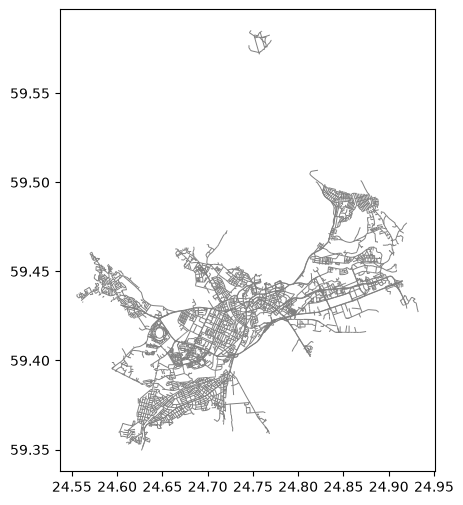
Initialise the OSM reader with a file path, then read a network for a given travel mode:
Working with large files? The reader streams the file with bounded memory (the out-of-core engine), so large extracts (whole countries or even continents) can be read too; pass
workers="auto"to decode them in parallel:OSM(fp, workers="auto"). See Reading large datasets with the out-of-core engine for details.
%matplotlib inline
osm = OSM(fp)
drive = osm.get_network("driving")
drive.head(3)
| access | bicycle | bicycle_road | bridge | busway | cycleway | foot | highway | int_ref | junction | ... | turn | width | visible | id | timestamp | version | tags | osm_type | geometry | length | |
|---|---|---|---|---|---|---|---|---|---|---|---|---|---|---|---|---|---|---|---|---|---|
| 0 | NaN | NaN | NaN | NaN | NaN | NaN | NaN | living_street | NaN | NaN | ... | NaN | NaN | True | 4016128 | 0 | 27 | {"noname":"yes"} | way | LINESTRING (24.66446 59.39728, 24.66459 59.3974) | 16.0 |
| 1 | NaN | NaN | NaN | NaN | NaN | NaN | no | secondary | NaN | NaN | ... | NaN | NaN | True | 4016133 | 0 | 23 | {"lanes:backward":"1","lanes:forward":"1","sid... | way | LINESTRING (24.63663 59.3793, 24.63653 59.3791... | 1680.0 |
| 2 | NaN | NaN | NaN | NaN | NaN | NaN | no | secondary | NaN | NaN | ... | NaN | NaN | True | 4016148 | 0 | 27 | {"lanes:backward":"2","lanes:forward":"1","sou... | way | LINESTRING (24.67358 59.39437, 24.67373 59.394... | 188.0 |
3 rows × 36 columns
ax = drive.plot(figsize=(6, 6), color="gray", linewidth=0.7)
Read buildings and POIs#
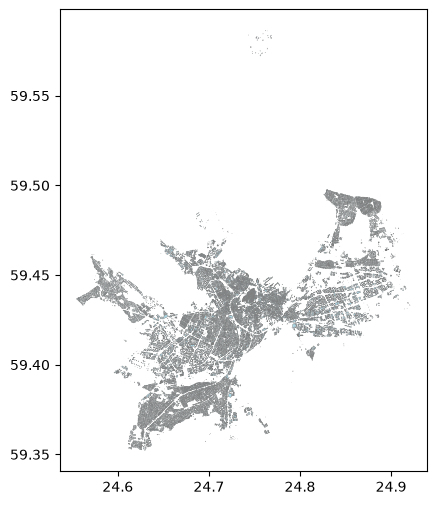
The same reader extracts other datasets — buildings, Points of Interest, landuse, natural elements and boundaries:
buildings = osm.get_buildings()
pois = osm.get_pois()
print("buildings:", len(buildings), "| POIs:", len(pois))
ax = buildings.plot(figsize=(6, 6), color="lightblue", edgecolor="gray", linewidth=0.3)
buildings: 55307 | POIs: 64604
Export a network to a graph#
Street networks can be exported as a directed graph for networkx, igraph or pandarm:
nodes, edges = osm.get_network(nodes=True)
G = OSM.to_graph(nodes, edges, graph_type="networkx")
type(G)
networkx.classes.multidigraph.MultiDiGraph
Crop a PBF to a smaller file#
You can write a smaller .osm.pbf that covers only a bounding box — handy before sharing a file or re-reading a sub-area:
import os
from pyrosm import get_data

# Extent of the current data
minx, miny, maxx, maxy = buildings.total_bounds

# Keep roughly the south-west quarter and write it to a new PBF
bbox = [minx, miny, (minx + maxx) / 2, (miny + maxy) / 2]

# Write to PBF based on bounding box
cropped = OSM(fp, bounding_box=bbox).to_pbf()

size_mb = os.path.getsize(cropped) / (1024 * 1024)
print(f"wrote {os.path.basename(cropped)} ({size_mb:.2f} MB)")
wrote pyrosm_crop_1rakq3cr.osm.pbf (7.81 MB)
Where to next#
Downloading OSM data — by name, bounding box or place name
Reading OSM datasets — networks, buildings, POIs, landuse, natural, boundaries, history
Tags and columns — control columns and memory
Saving and cropping data —
to_pbfandwrite_pbfWorking with graphs — export networks and analyse them